Your Roblox Discord is a retention signal you're ignoring
It's Monday. Your Roblox game lost two points of D7 over the weekend, and your Discord server has 18,000 new messages waiting. Most studios react in one of two ways: stare at the analytics dashboard, or scroll #general until something catches the eye. Both miss the point. Your Roblox Discord is already telling you why retention slipped — you just need to read it as data.
This piece is for community managers and producers at Roblox studios who already run a Discord and already track retention, but haven't joined the two together. By the end you'll have a concrete read on what Discord is telling you about churn, and a Monday-morning workflow that doesn't burn six hours of scrolling.
The gap most Roblox studios sit in
Most live Roblox studios already use Discord for the same handful of jobs: hype around updates, event coordination, a bug-report webhook channel, maybe a feedback forum, and a moderation pipeline. The tooling around it has matured fast. Bloxlink, RoVer, RoManager, Hyra, and Melonly all do a great job at running the server — verifying members, syncing group ranks, tracking staff activity, automating moderation.
None of them read what your players are actually saying.
So the typical setup at a 200k-member Roblox community Discord looks like this: ops tooling is solid, the server is well-moderated, the bug webhooks fire, and the community manager is left to scroll through thousands of messages a day to figure out what players actually want. Discord's own native server metrics, in the words of one community manager we work with, are "frankly poor." Message counts and sticker reactions don't tell you that the new boss is too punishing, that monetization sentiment shifted overnight, or that your last update broke something for a specific cohort.
If you've spent any time in the Roblox DevForum's retention threads, you've seen this play out: pages of advice on tutorial pacing and core-loop tuning, almost nothing on what your Discord is already telling you. That's the gap. Operating a Discord and reading a Discord are different jobs, and right now most Roblox studios only have tools for the first one.
What Discord actually tells you about retention
Discord conversation moves before retention metrics do. By the time a D7 dip shows up in the dashboard, the signal has been visible in chat for days. The trick is knowing what to look at.
A few patterns show up consistently across the live-service Discords we work with:
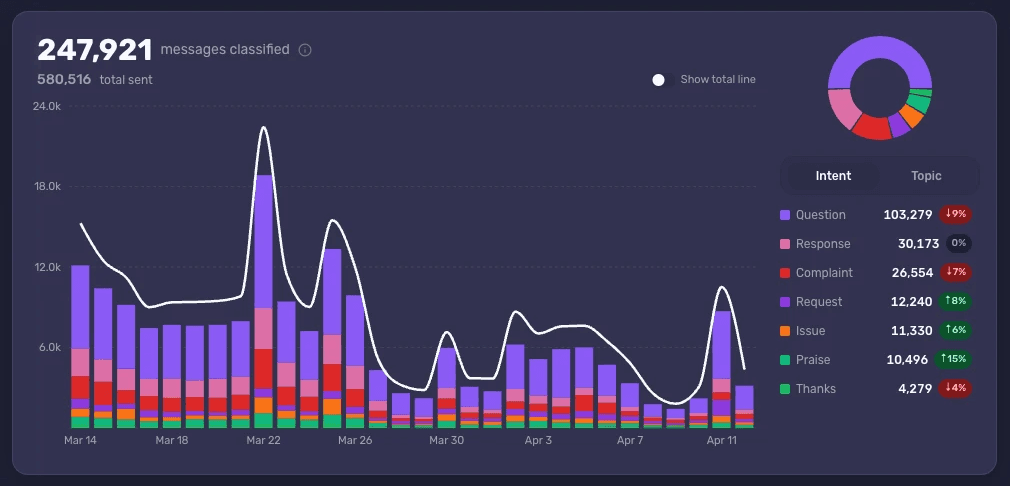
Praise-to-complaint ratio shifting. When the share of Complaint and Issue messages climbs against Praise and Thanks, that's a leading indicator. Sparkchart trend mini-charts on the Topics page make the shift obvious in seconds.
A Topic spiking out of nowhere. A subtopic like "spawn camping" or "Robux pricing" jumping 4x week-on-week is rarely random — it usually maps to something you shipped, something a creator on TikTok said, or a competing game stealing attention.
A specific Mention going negative. When players name a specific feature, item, or character far more than usual, and the Intent on those messages tilts to Complaint, that feature is the thing dragging your retention.
Update reactions that don't recover. Healthy update launches show a praise spike, a complaint spike, then both relax within 48 hours. If complaints stay elevated past day three, the update isn't landing.
This is what Accord automates. Rather than reading the server, you scan a page that shows Topics broken down by Intent, with sparkchart trends and percent-change indicators on each one — the same data you'd extract by hand if you had three days a week to do it.
Don't be steered by the squeakiest new account
The Roblox community manager's daily hazard isn't lack of feedback — it's bad feedback weighted incorrectly. A new account joins your Discord on Saturday, posts five times in an hour about Robux being too expensive, and three other new members pile on. By Monday morning the producer is asking whether to lower the price of a key developer product.
This is the moment to slow down and check who is actually saying it.
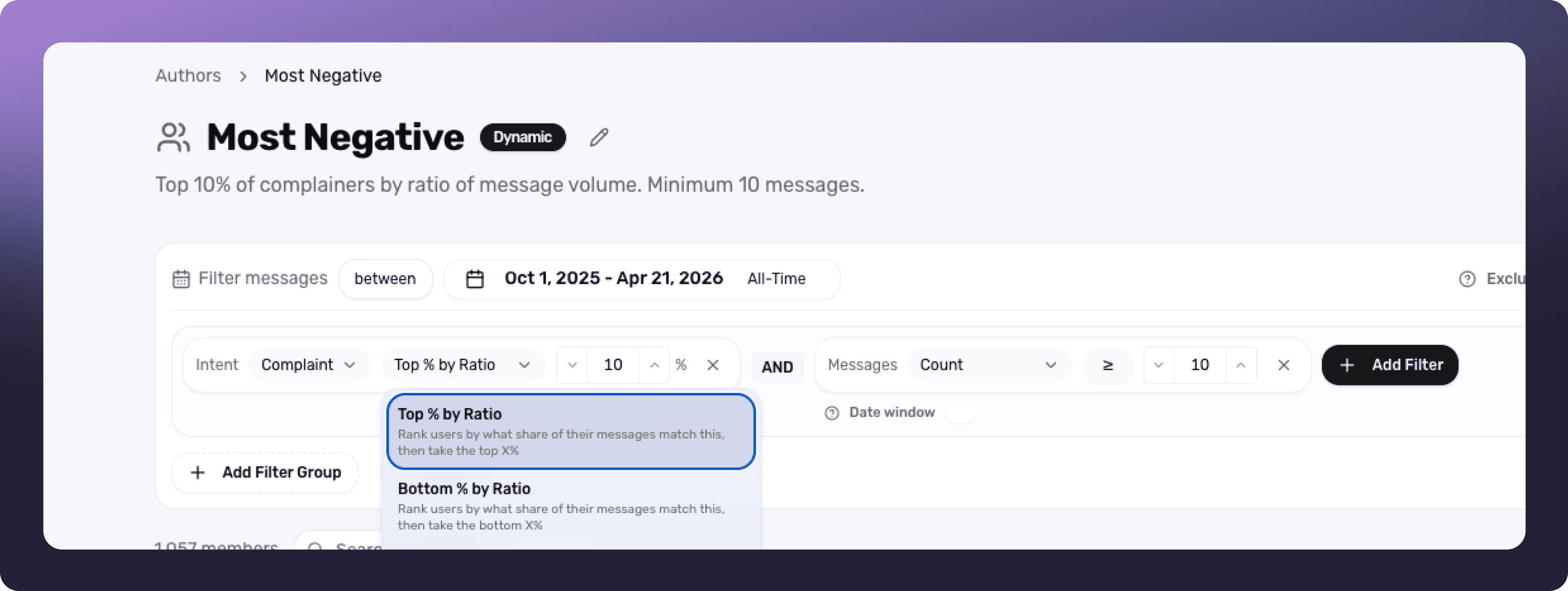
A cohort built on the ratio of complaint messages, rather than raw volume, surfaces the small group of accounts whose entire footprint is criticism. Compare that to the cohort of long-tenured, high-volume contributors and you usually find the two groups disagree. One of our customers describes catching this exact pattern on their own Discord: a wave of new accounts complaining about monetization, while the active veteran cohort was telling product the opposite — they liked the current pricing. Cohort analysis kept that team from shipping a change they'd have regretted.
The same pattern shows up constantly in Roblox community Discords, and it's worth a shortcut into your Monday workflow. New-account complaint volume is a real signal, but it's a different signal from what your established players think. Treat them separately.
Compare reactions across updates, not just within them
Roblox is a live-service platform by default. If you're running a successful game, you're shipping weekly. Each update is a small experiment, and the most useful retention question is rarely "did this one update land?" — it's "did this update land better or worse than the last three?"
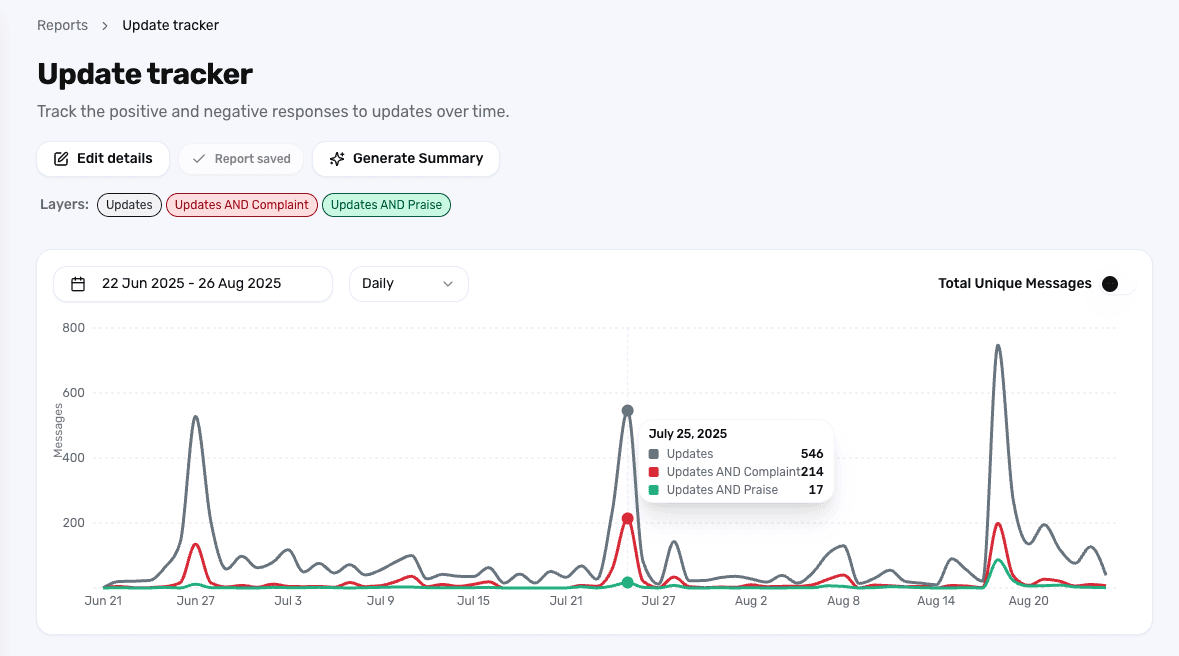
A Report comparing player response across update timestamps surfaces the slope. You can see whether complaint volume around the new boss is genuinely worse than the last seasonal event or just feels worse because it's recent. You can spot when a specific Topic — say, server lag — is creeping up update after update, even when no single update produces a panic. And you can do all of this without rebuilding the analysis from scratch every time.
Most Roblox studios I've talked to are already keeping informal scorecards of "did the update go well?" in a Notion doc or a producer's head. A saved Report turns that into something you can revisit, share, and trust.
A Monday-morning workflow for Roblox community managers
If you take nothing else from this post, take the workflow. Twenty minutes once a week beats six hours of scrolling.
Open your saved weekly Report. Glance at the sparkcharts. Anything that's moved more than ~30% week-on-week deserves attention.
Generate a Summary. Let Accord write the digest of what shifted. Save it to history so the trend over weeks stays visible to your team.
Check Topic-by-Intent breakdowns for anything that spiked. Drill into the messages behind the spike — Accord links you straight to the source quotes.
Pull the squeaky-wheel cohort vs. veteran cohort on any monetization or balance topic. If they disagree, that's the most important finding of your week.
Bring two findings to the producer's standup. Not ten. Two ranked, sourced, quote-backed findings beat a 30-line summary every time.
That's the loop. It's the same one Gregory Castle, a growth community manager we work with at Spark Universe, runs every morning on his 25k-message-a-month community. "Accord is now one of the four things I click on when I open my computer in the morning," he told us. "I can find something useful from a quick report nine times out of ten." The volumes are different on a Roblox live-service Discord, but the loop scales: at a million messages a month it's the only way to keep up.
What this looks like at scale
Some of the busiest Roblox-game Discords on the platform clear a million messages a month at peak. There's no version of "the community manager just reads the server" that works at that volume. The same is true at Wonder Works Studio (SpongeBob Tower Defence, 500k+/mo), and at every Roblox studio whose Discord cleared 100k members.
The studios that pull ahead in live service aren't the ones with the biggest community team. They're the ones whose CM can answer "what shifted in player sentiment this week?" in five minutes instead of five days. That's a tooling problem, not a headcount one.
Discord is the richest source of player feedback most Roblox studios own, and almost none of them are reading it as data. The tooling cluster around your server (Bloxlink, Hyra, RoVer, Melonly) is great at operating the community. It doesn't help you understand what your community is saying. That's where the gap is, and it's also where the retention signal you've been missing actually lives.
See what Accord surfaces in your Roblox community's Discord — book a demo.