What Roblox Discord tooling does what — and what's missing
If you're running a Roblox game's Discord, your stack probably has more bots than people on your team. Bloxlink and RoVer for verification. RoManager or Hyra for ranks and staff. Melonly for moderation. A webhook or two to push bug reports into a private channel. It's a lot of plumbing, and most of it works well. The question worth asking once a quarter: what jobs is this stack actually doing, and which jobs is it leaving on the floor?
This post maps it out. By the end you'll have a simple test for whether your tooling stack is complete or has a hole in the middle.
Four jobs your Roblox Discord stack has to do
Every live Roblox game ends up needing four overlapping jobs from its community Discord:
Identity — knowing which Discord member is which Roblox account, and what role they have in your group.
Operations — moderation, staff workflows, applications, bans, raid response.
Funneling — getting bug reports, feature requests, and player support tickets out of Discord chaos and into the right channel for your team.
Reading — understanding what your community is collectively saying about the game, the updates, and the studio.
Most stacks cover three of these well. The fourth is where the gap usually sits.
Operating the server (Bloxlink, RoVer, Hyra, Melonly territory)
The identity and operations layers are mature. Bloxlink and RoVer handle Roblox-to-Discord verification, sync group ranks, and keep nicknames current. RoManager does similar work as a free alternative.
For staff and moderation, Hyra gives you activity tracking, application forms, departments, and group-wide reporting. Melonly leans into roleplay and large-server moderation. Both are aimed squarely at running the community: keeping the staff team accountable, tracking shifts, and handling the mod queue.
If you're a Roblox studio with a 100k+ member Discord, you almost certainly have some combination of these installed. They are the right tools for those jobs and they keep getting better.
Funneling feedback (webhooks and bots)
The funnel layer is more DIY. Most studios end up wiring a webhook from their game into a private #bug-reports channel, then maybe writing a small Discord bot to let players submit reports without opening a ticket. The DevForum has dozens of threads walking through how to build this — webhooks, GUI flows, screenshot uploads, log forwarding.
This layer works for intake. What it doesn't give you is a way to deal with what comes through. Two engineers can be looking into the same complaint by lunch because three players posted slightly different versions of the same bug. The webhook is doing its job; the surrounding workflow isn't.
Reading the server (the gap)
Identity, ops, and funneling all answer questions about who is in your community and what they did inside Discord. None of them answer what they're saying.
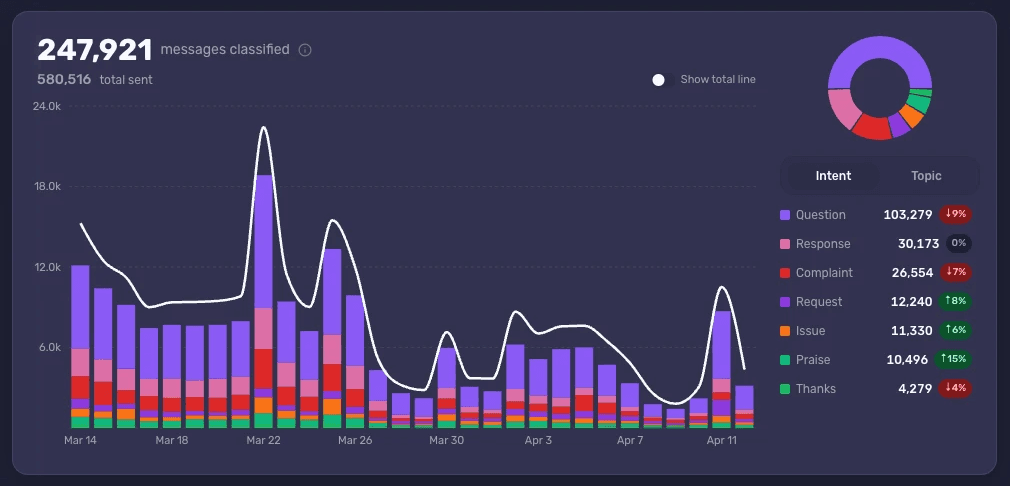
Discord's own native server insights cover message counts, active members, and channel volume. They are useful for trend lines and not much else. They don't tell you that monetization sentiment shifted overnight, that a specific weapon is now driving most of your complaints, or that the praise-to-complaint ratio on a recent update has crossed a worrying line.
Reading the server is its own job. It needs:
A way to classify what every message is doing — Complaint, Request, Issue, Praise, Question — so you can spot shifts in the mix.
A way to detect Topics and Mentions automatically so emerging themes don't depend on a CM scrolling at the right moment.
A way to compare segments of your community against each other, not just look at totals.
A way to compare reactions across updates over time, not just within the day a patch ships.
This is the layer of your stack that is almost certainly underbuilt. It's also the layer that turns Discord into a retention signal instead of just a comms channel.
A simple test for whether your stack is complete
Ask your community manager three questions on a Wednesday afternoon:
What's the top complaint Topic in the server right now, and how does it compare to last week?
Are veteran community members reacting to the latest update differently from new accounts?
Has any specific feature, item, or character started getting mentioned more in the last seven days?
If the answers come back inside two minutes with a reference to a saved view, your stack is complete. If the answers come back as "let me scroll through #general for an hour," the reading layer of your stack is missing — and your CM is doing it manually with their attention. That's expensive even if you don't see it on a budget line.
What to add next
If your identity and ops layers already work, the cleanest upgrade is to add the reading layer rather than swap out anything you already have. The bots that run your server should keep running it. What changes is that the community manager gets a dashboard alongside the bots — a place where Topics, Intents, Mentions, and cohorts surface automatically, and where the question "what's actually going on this week?" has a five-minute answer.
That's where Accord fits. It's not replacing Bloxlink, Hyra, or your bug-report webhook. It's the thing that finally reads everything those tools collect.
See what Accord surfaces in your Roblox community's Discord — book a demo.