The 2026 Discord Audit Logs Guide (And Why They're Not Analytics)
Article
Discord audit logs are the closest thing a server admin gets to a database of what happened. Every moderator action, every channel edit, every role change, every webhook update. They're built into Discord, free, and exhaustive. They are also — almost regardless of how diligently you read them — the wrong place to look if the question you're actually asking is "how is our community doing?"
This is the comprehensive 2026 reference for what Discord audit logs capture, what each action type means, and the boundary between server monitoring (what audit logs do well) and community intelligence (what they don't do at all).
What Discord audit logs actually capture
The audit log lives in Server Settings → Audit Log, with up to 90 days of history. Each entry has a timestamp, an action type, an actor, a target, and (when applicable) a before/after state. As of 2026, Discord ships around 50 distinct action types across six categories.
Member actions
Action | What it records |
|---|---|
| A moderator kicked a member from the server |
| A member was banned (with reason if supplied) |
| A ban was lifted |
| A member's nickname was changed |
| Roles were added or removed from a member |
| A member was moved between voice channels |
| A member was disconnected from voice |
| Inactive members pruned from the server |
| A bot was added to the server |
Channel actions
Action | What it records |
|---|---|
| Channels created, deleted, or modified |
| Per-channel permission overrides changed |
| A moderator deleted someone else's message |
| A moderator bulk-deleted messages (e.g., during a raid) |
| A message was pinned or unpinned |
| Threads created, deleted, or modified |
Role actions
ROLE_CREATE, ROLE_DELETE, ROLE_UPDATE — including permission changes, name changes, colour changes, and hoist toggles.
Server actions
GUILD_UPDATE for server-wide setting changes (name, icon, verification level, default notification setting, system channel, AFK channel/timeout, MFA requirements, vanity URL).
Invite actions
INVITE_CREATE, INVITE_DELETE, INVITE_UPDATE — who made an invite, when, with what code, how many uses.
Webhook + Integration + Emoji + Sticker
WEBHOOK_*, INTEGRATION_*, EMOJI_*, STICKER_* — server-asset administrative changes.
AutoMod actions
Action | What it records |
|---|---|
| AutoMod rules changed |
| AutoMod blocked a message matching a rule |
| AutoMod flagged a message to a moderator channel |
| AutoMod time-out applied to a user |
That's effectively the full surface. Discord exposes this through the in-app audit log view and through the Bot API (/guilds/{guild.id}/audit-logs), with the same 90-day retention either way. Bots like Carl-bot, MEE6, and Dyno write their own log channels that often capture more granular state than the native audit log — for example, the content of deleted messages, which Discord intentionally doesn't preserve in the native log.
What audit logs are good for
Audit logs do one thing extremely well: they create a defensible, timestamped record of administrative events. That makes them genuinely useful for:
Moderator accountability. Who kicked, banned, or muted whom, when, and with what reason. If a moderator goes rogue or a contractor needs to be audited, the log is the source of truth.
Incident reconstruction. During or after a raid, the bulk-delete and ban entries reconstruct what happened. AutoMod's flag entries plus message-delete entries reconstruct what messages triggered which rules.
Access control changes. When did
@everyoneloseMENTION_EVERYONE? When did the new mod role get created? Audit log answers in seconds.Compliance and trust signals. For studios with platform partnerships or with monetization tied to community health, a clean audit log demonstrates moderation hygiene.
Bot debugging. When integrations break, the audit log shows whether webhooks, roles, or permissions changed underneath them.
If your job involves answering "who did what to this server, and when?" — audit logs are the right tool. They're also the only tool, and they're already there.
What audit logs are not good for
The trap is treating audit logs as a proxy for community health. Six structural reasons they aren't:
They record events, not patterns. An audit log is a stream of discrete admin actions. The most important things happening in a Discord community — sentiment shifts, topic emergence, cohort drift, churn signals — are patterns across messages, not events. A 12% rise in complaint-to-praise ratio in #general-chat shows up in zero audit log entries. The wave that predicts a D14 retention drop is invisible.
They don't include message content. Native audit logs deliberately exclude the bodies of messages. You can see that 120 messages were bulk-deleted; you can't see what they said. Without content, you can't classify, summarise, or trend the actual conversation.
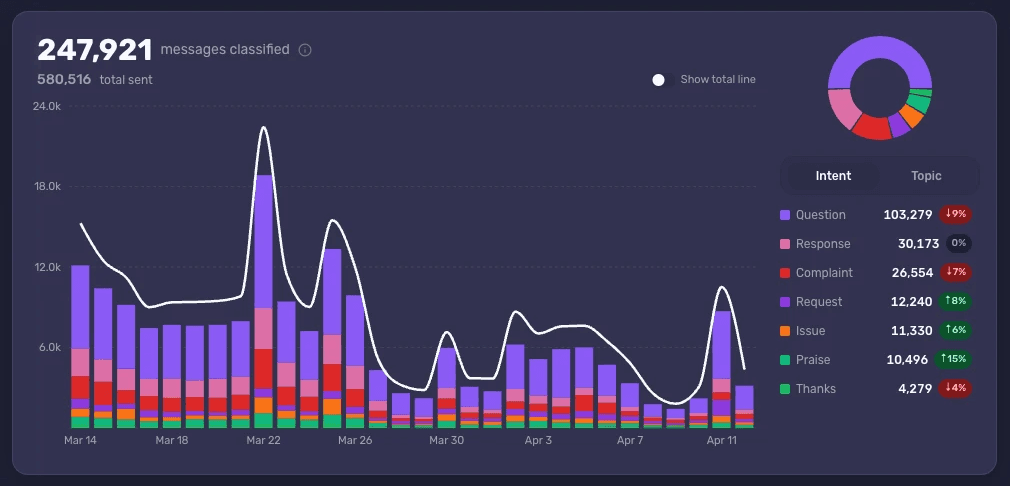
They don't classify intent. Even if you piped every deleted message into a log channel via a bot, you'd get raw text. The audit log itself has no concept of what kind of message something was. A community-health pipeline needs Complaint, Request, Issue, Praise, Question, Thanks, and Response as primary dimensions — none of which exist in the audit log schema.
They're 90 days max. Quarterly or year-over-year analysis is impossible from native logs alone. The pattern you care about most — "is sentiment trending up or down over the year?" — needs more history than Discord retains.
They surface moderation noise, not retention signal. A spike in MEMBER_BAN_ADD entries usually means a raid or a coordinated brigade. A spike in voluntary churn — veterans quietly leaving on their own — is MEMBER_DISCONNECT-adjacent at best, and entirely uncategorised when those veterans simply stop posting without leaving. The events that predict churn aren't in the log.
They reward the loudest moderation actions, not the most consequential community moments. Hundreds of AUTO_MODERATION_BLOCK_MESSAGE entries per day at a busy server feel important. Most of them are spam. The two-week run-up to a monetisation backlash that the team should have caught in week three is silent in the log.
This is what in-house teams reading audit logs and dashboards consistently miss. The events feel like signal because they're countable. The actual signal sits in the message corpus the audit log doesn't include.
Server monitoring vs. community intelligence
The cleanest mental model is two separate jobs, both real, neither sufficient alone:
Server monitoring answers "what happened administratively to the server?" — bans, kicks, role changes, integrations, AutoMod rule fires, raid detection. Audit logs and moderation bots cover this. Most servers have it well in hand by month three.
Community intelligence answers "what is the community actually saying and feeling, and how is it changing?" — Topics, Intents, cohorts, language, sentiment, counter-narratives, slow-burn shifts. No audit log addresses any of these. Native Discord Insights gives you message-count and active-member numbers, which is closer to monitoring than intelligence.
Most studios stop at server monitoring and assume the second job is being handled by the community manager reading the server. Past about 50,000 messages a month, that assumption stops being true. The audit log keeps being complete; the community picture stops being.
What community intelligence adds on top of audit logs
A complete read of a live-service Discord pairs the audit log with a classified message corpus and a few specific cross-channel views:
Intent classification on every message — including the ones AutoMod blocked, the replies in threads, and the casual chatter in
#generalthat audit logs never touch.Cohort analysis by ratio — so loud-minority complaints don't get weighted equal to slow veteran disengagement. The forum echo-chamber problem is the same problem here applied to administrative-event reading: counts mislead.
Author status correlated with sentiment. Audit log says
MEMBER_BAN_ADD. Intelligence layer says "this banned account was the source of 40% of the complaint volume on monetisation in the last 14 days" — and that's the column the audit log doesn't have.Trends over arbitrary timescales. Year-over-year, update-over-update, cohort-over-cohort comparisons that the 90-day audit log retention makes impossible.
Multilingual coverage. Audit logs are language-agnostic because they don't contain content; classification needs to handle the languages your community actually uses.
Pattern-level summaries on demand. "What did the server say about the new boss this week?" is the question audit logs can't even attempt. It's the one a community team needs to answer every Monday.
The audit log is necessary infrastructure. It is not the dashboard. Treating it as the dashboard is how studios convince themselves their community is healthy three weeks before a backlash that was visible in chat the whole time.
The honest version
Discord audit logs are a complete record of what was done to the server. They are not a record of what the community is doing. The two are different datasets, answer different questions, and need different tooling. Studios that wire their audit-log channel to a Slack bot, glance at it daily, and conclude their community is in good shape are reading the wrong file.
The right pairing is simple: keep the audit log for moderation accountability and incident response, where it's unbeatable. Add an intelligence layer for the question the audit log was never built to answer.
See what Accord surfaces in your Discord community — book a demo.